








 Flashlight
 Solar
Extension Cable
Solar
Extension Cable


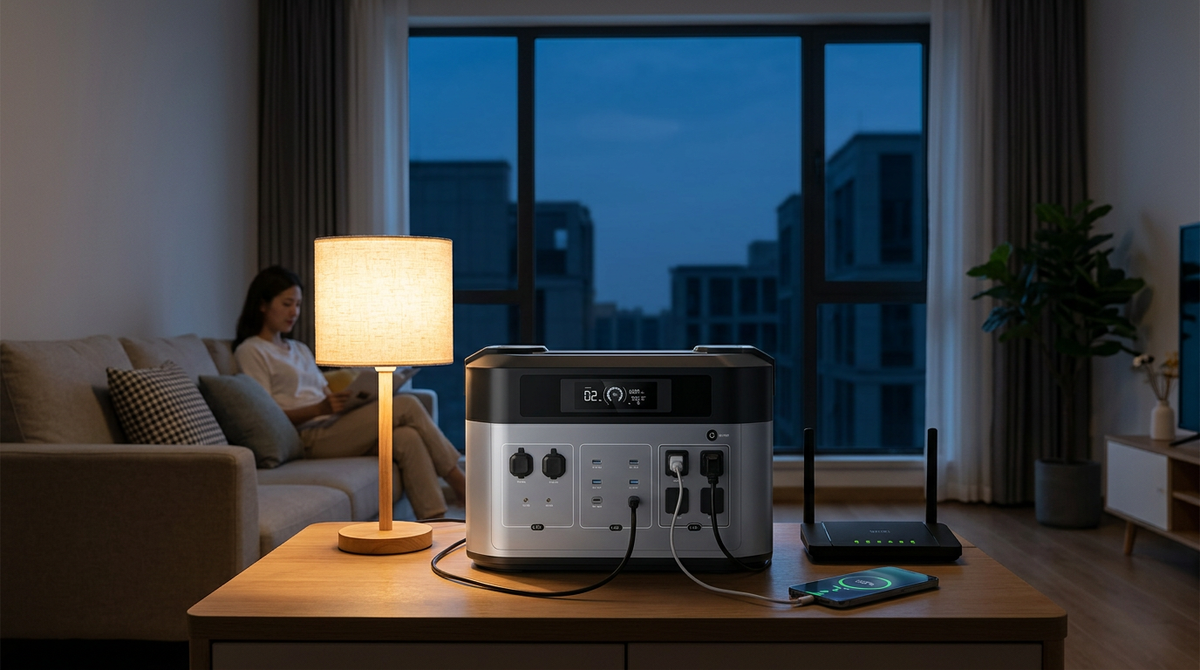
Portable Power Station for Apartment Blackouts: Indoor Backup Guide
A portable power station for apartment blackout keeps your essential devices running when the grid goes down. Unlike a gas generator, this portable power station for apartment blackout provides indoor backup power without fuel, exhaust, or the need for outdoor space. The routine is dead simple. Charge it ahead of time, keep it indoors, plug in what matters when the lights go out.
For most renters, that means phones, Wi-Fi, a laptop, a lamp, a fan, and sometimes a fridge or a medical device.
Size is the whole decision. Small units cover phones and a router. Mid-size ones carry a home office through most of a workday. Bigger ones reach into long outages or short fridge duty. And apartments pile on their own constraints: no yard, shared walls, lease rules, and nowhere safe to park a gas generator.
Below, we cover how apartment backup actually works, what runs safely indoors, how much capacity to buy, and where to keep the thing. We map sizes to real scenarios, walk the runtime math, and call out the mistakes renters keep making.
Why Apartment Blackouts Need a Different Backup Plan
Apartment backup power with a portable power station comes with different challenges than backup power for a house. Renters get none of that. Add shared walls, thin storage, and lease rules, and the usual outage advice stops fitting.
Gas generators are the clearest example. They spew carbon monoxide, so they cannot run indoors, in a hallway, or on a balcony, where the fumes drift right back inside. The CPSC counts roughly 100 deaths a year in the United States from generator carbon monoxide, most of them during outages (CPSC Carbon Monoxide Information Center).
That is where a battery unit earns its place. Nothing burns. No gas to pour, no exhaust to vent, so it sits on your living-room floor and you plug straight in. Setup is trivial too.
You are not drilling walls or snaking cords down a hallway, both of which most leases ban outright. Devices go into the AC, USB, and DC ports, and that is the whole install.
Aim for essentials, not the whole apartment. Phone, router, laptop, a lamp, a fan, a CPAP, maybe a mini fridge. That short list covers most renters. Kettles, microwaves, and space heaters are the trap: they make heat, which means they eat a battery in minutes and can blow past the output ceiling. Think of your reserve as a budget. Spend fewer watts, run longer.
What Is a Portable Power Station?
Strip away the marketing, and it is a rechargeable battery in a box, wrapped in outlets and safety controls. For apartment renters, it works as an indoor-safe battery backup for apartment outages, keeping essential devices powered without fuel or exhaust. Inside sits an inverter that turns the stored charge into normal wall power.
Outside you get AC sockets, USB-A and USB-C, a 12V car port, and a display. Picture a giant power bank, except this one runs routers, laptops, lamps, fans, and some appliances. Recharge it from the wall. Many also take a car socket or solar panels.
The names blur together, so here is the plain version. The power station is the battery itself. Bundle it with panels that refill it in sunlight and marketers call the kit a solar generator.
A gas generator is a different animal entirely: an engine burning fuel, exhaust and all, strictly outdoors. And a power bank? Tiny by comparison. It tops up a phone and usually has no AC outlet at all.
The table below compares a portable power station for apartment blackout backup with solar generators, gas generators, and power banks, so you can see which option best fits apartment living.
|
Option |
Best for |
Runs indoors? |
Apartment fit |
|
Portable power station |
Phones, Wi-Fi, laptop, lamp, fan, fridge (sized right) |
Yes, no exhaust |
Strong. Plug-and-play, quiet |
|
Solar generator |
Same, plus daytime recharge from panels |
Battery indoors, panels outside |
Good with a sunny balcony |
|
Gas generator |
High output for long runs with fuel |
No, outdoors only |
Poor. Exhaust and fuel rules |
|
Power bank |
Phones, earbuds, some tablets |
Yes |
Handy add-on, not a backup |
For apartment backup, the power station does the heavy lifting. Charge it from the wall before trouble hits, and keep a power bank around as a cheap sidekick for phones. Solar is a nice-to-have if your building signs off. Not a requirement.
Can a Portable Power Station Be Used Indoors?
Yes, and that is the whole appeal. There is no exhaust, so a battery unit runs indoors safely as long as you follow the manual. It is still a big battery, though. Keep it dry, give it air, do not push it past its limit. The chemistry helps here.
Modern packs use LiFePO4 (lithium iron phosphate). It is far more stable than the older lithium-ion and carries significantly lower thermal runaway risk, so it is generally considered safe for indoor use.
The OUKITEL BP2000 runs LiFePO4 rated for 3,500-plus cycles behind a pure sine wave inverter.
You only need to keep a few things in mind. Set it on a flat, stable surface and leave the vents uncovered so air can circulate. If you do that, you're already off to a good start. Just avoid placing it under a blanket, inside a sealed cabinet, or right next to a heater. Water is another thing to watch for, so bathrooms, wet counters, and a rainy balcony are all best avoided.
A power strip is usually fine if it's rated for the load. If the display shows the wattage climbing, it's worth unplugging anything you don't really need.
Not buried behind the suitcases. Keep the charging cable and appliance cords with it, tag the router or CPAP plug, and top it up every few months. When a storm or heatwave shows on the forecast, charge it to full before it lands.
What Can a Portable Power Station Run During an Apartment Blackout?
Outages box you in. No balcony space for a roaring generator, no cords snaking down the hall. So the battery becomes your quiet indoor hub. Be honest about the ceiling, though. These units keep your life connected. They will not run the apartment the way the grid did.

[IMAGE: Alt: Portable power station for apartment blackout powering a laptop, monitor, and router at a home office desk | 16:9]
Small stuff is the sweet spot. Phones, laptops, routers, LED lamps, a desk fan, each sipping somewhere between 5 and 60 watts, which even a budget unit sustains for ages. Step up to a TV, a modem, a CPAP, or a compact mini fridge and you want a mid-size battery and a plan.
Medical gear needs clean output, so insist on a pure sine wave inverter. We have walked a lot of renters through this, and a CPAP without its humidifier lands around 30 to 60W, which a 1,000Wh unit carries all night with room to spare.
- Phone: 5 to 15W while charging.
- Router plus modem: 10 to 30W together.
- Laptops land between 30 and 90W.
- LED lamp or light bar: 5 to 15W.
- A small fan pulls 20 to 60W.
Big draws are where small units hit the wall. A full-size fridge? A mid-to-large battery handles it.
Anything that makes heat is the problem.
Microwaves, coffee makers, toaster ovens, space heaters routinely pull 1,000 to 1,500 watts, enough to overload a small station or drain a mid-size one in minutes. And short of a large expandable system, forget central AC, an electric oven, a glass-top stove, baseboard heat, or the washer and dryer. Those live on circuits a portable simply cannot feed.
How Much Power Do You Need for an Apartment Blackout?

Sizing is just matching the battery to your gear. Three numbers carry the whole thing. Watts are the pull right now, while a device runs. Watt-hours are the tank, the total energy on board. Surge is the odd one out: a quick spike a fridge or motor demands at startup before it settles down.
- Watts (W): the pull at this moment. Laptop, 60W. Microwave, 1,000W.
- Watt-hours (Wh): the tank. A 500Wh pack gives 500W for an hour, in theory.
- Surge: the startup jolt. Fridges spike to 1,200 to 2,000W, then drop to 100 to 200W.
Runtime starts as capacity over draw, then you shave off the losses the inverter, display, and fans burn. Real runtime = (battery Wh × 0.85) / device watts. This gives you a simplified estimate for apartment blackouts, but actual runtime varies with battery efficiency, appliance behavior, and operating conditions.
Run a 60W load off a 1,024Wh pack and you are near 14.5 hours. If you're still deciding on capacity, see our guide on what size portable power station you need for a more detailed sizing breakdown.
Point that same pack at a 150W fridge and the raw math says 5.8 hours of compressor time, but real life runs far longer once the compressor cycles on and off. Not sure how much electricity common household appliances use? The U.S. Energy Information Administration explains how electricity is used in homes and which appliances consume the most power.
Most renters land in one of a few buckets. The table below pairs a common goal with a capacity range and a sample load. Treat it as a floor, then pad it by roughly 20 percent. Running medical gear? Check your equipment's exact draw against the maker's spec before you trust it to anything.
|
Scenario |
Capacity |
Sample load |
Runtime goal |
|
Short outage |
300 to 700Wh |
Router, 2 phones, LED lamp, laptop, small fan |
4 to 8 hours |
|
Work-from-home |
700 to 1,000Wh |
Router, laptop, 27-inch monitor, phone, lamp |
Full 8-hour shift |
|
Food protection |
1,000 to 2,000Wh |
Refrigerator (cycling), router, lights, phones |
12 to 24 hours |
|
Medical or comfort |
1,000Wh and up |
CPAP, fan, phone, medical device charging |
Overnight, pure sine wave |
|
Frequent outages |
2,000Wh and up |
Fridge plus essentials, expandable battery |
Multi-day with recharge |
Best Portable Power Station Size for Apartment Blackout Backup
Rather than chase one model, shop by battery-size category so the unit matches your space and budget. For the math behind these ranges, see our guide on what size portable power station you need.
Power stations come in rough capacity tiers, and each tier fits a different apartment need.
The 300 to 500Wh tier is the entry level. It suits renters and students who want basic outage coverage. It handles phone charging, a router, and a few lights, and it stores easily on a closet shelf.
The 700 to 1,000Wh tier fits most apartments. It balances capacity, price, weight, and runtime. A unit this size runs a remote workday. It can also power a fan and router overnight while staying light enough to carry in one hand. To make these size ranges more practical, here are OUKITEL's apartment-friendly options that fit each capacity tier. TheOUKITEL P1000 Plus sits in this tier. It offers 1,024Wh and 1,800W. It weighs about 26.5 pounds and runs a pure sine wave inverter clean enough for a CPAP.
The 1,000 to 2,000Wh tier is where a full-size fridge becomes practical. You can also run Wi-Fi, lights, phones, and fans at the same time. TheOUKITEL BP2000 fits here. It offers 2,048Wh and 2,200W continuous, and its 4,000W surge covers a fridge startup. It also expands with B2000 packs up to 16,384Wh.
Above 2,000Wh, units get wheels and target heavy loads. They cost more than most apartments need, and they only make sense if outages are frequent. TheOUKITEL BP2000 Pro keeps the same 2,048Wh base but raises continuous output to 3,300W.
Key Features to Look For Before Buying
Ignore the name on the box. Read the spec sheet instead. Start with watt-hours (Wh). Then two output numbers: continuous AC, the load it holds all day, and surge, the brief spike it can absorb. Anything with a motor, a fridge above all, lives or dies on that surge rating. Undersize it and the unit trips the second the compressor kicks in.
Two things are non-negotiable. First, a pure sine wave inverter. It feeds laptops, routers, and medical gear clean power. Cheaper modified sine wave units make motors buzz and can cook a power brick.
Second, LiFePO4 (LFP) chemistry. It runs 3,000 to 4,000 or more cycles before fading to 80 percent. Older lithium-ion manages maybe 500. It also stays calmer sitting in a closet for months.
Then the smaller stuff. A UPS or EPS mode stays plugged in with your gear behind it, flipping to battery in milliseconds the instant the grid dies.
Yes, it’s quieter than a generator. But not silent once the fans spin up. And weight climbs fast (10 to 25 pounds around 300 to 700Wh, north of 60 by the time you hit 2,000Wh).
- Enough AC sockets, spaced so one fat plug does not block the next.
- USB-C PD, 60 to 100W, so the laptop charges without its brick.
- Switchover under 10ms on UPS or EPS for anything sensitive.
- 0 to 80 percent in about an hour beats a 12-hour crawl, making it easier to recharge before a forecasted blackout or between outages.
- UL or ETL certified, backed by a 3-to-5-year warranty.
How to Use a Portable Power Station During a Power Outage

When the lights die, resist the urge to plug in everything. The job is simpler than that: stay safe, cover essentials, make the charge last. The unit helps because it brings power to the exact devices you choose, nothing more.
Step 1: Check the Outage and Plug In Essentials First
Figure out the scope first. Your unit alone, or the whole building? Check the breaker panel, glance at the hallway lights, look for a building notice, and flag a wider outage to your utility or management.
Leave the fridge and freezer shut, since a full freezer holds cold for about 48 hours (FEMA Power Outages). Then plug in only the necessities. Medical device first if you rely on one. Phone and router next. Lamp or laptop after that. The TV, the console, the microwave can wait unless you have charge to burn.
Step 2: Watch the Display and Rotate Devices
The screen is your dashboard: battery percentage, watts out, watts in, time remaining. Watch the output number. A sudden climb means one device is hogging the battery. Rotating loads buys you hours.
Charge the phone, then unplug it. Run the fan a while, then kill it. One lamp, not five. A laptop that is already full can coast on its own battery for a stretch. No small unit runs everything at once, but managed carefully, it stays useful far longer than the spec sheet suggests.
Step 3: Protect Food During Longer Outages
Got a big enough unit? A fridge becomes doable for part of the outage. Confirm both its running and surge wattage against the station first. On a long outage, some people run it in bursts and keep it sealed between cycles.
Whatever you do, keep the door shut, because refrigerated food stays safe only about 4 hours unopened (FDA food and water safety).
How to Prepare Backup Power Before the Next Apartment Blackout

Build a blackout kit around your portable power station for apartment use before the next outage. Keep the power station, its charging cables, an LED lantern, and other essential supplies together in an easy-to-reach spot. .
So, it's better not to rely on simple things such as your phone's flashlight, and prepare a proper strategy for such emergencies. During a long outage, that phone is your lifeline, not your lamp. Pair this with a wider read on battery backup for a power outage.
Charge it ahead of storm or heat season, and again whenever a nasty forecast rolls in. Then dry-run it. Plug in the router, laptop, lamp, or fridge for half an hour and watch how fast the battery drops and what each device pulls.
Learning those numbers on a quiet afternoon beats discovering them by candlelight. A backup rig should be boring. Boring means reliable.
Can You Recharge a Portable Power Station in an Apartment During an Outage?
This is the hard part for renters. No yard for panels, no spot for a generator. Wall power is your workhorse, so keep the unit topped up while the grid is still on.
A car can help on a long outage if you can safely reach it, though it charges slowly, and never idle an engine in a closed garage. Balcony solar works in a pinch. Shade, glass, a bad angle, and building rules all drag the speed down, though.
- Wall power: your main charger. Full before the outage, always.
- Car charging is the slow backup, and only with real ventilation.
- Balcony solar tops up in direct sun. Do not count on a full refill.
- Shared outlets need permission, and cords never cross a hallway.
Tread carefully with shared outlets in hallways, garages, or the laundry room. Get permission, follow the rules, and skip long cords across common areas, which are a trip hazard waiting to happen.
If the outage is only local, a friend's place or a community center may recharge you faster anyway. The simplest plan wins: charge it before you ever need it.
Portable Power Station vs. Apartment Generator: Which Do You Need?

The word generator trips people up here. A gas machine and a battery unit are worlds apart, though. In most apartments the battery wins, hands down. It runs indoors, stays quiet, burns nothing. For a renter that means real backup without touching the wiring, installing hardware, or bumping into a lease clause, and it tucks into a closet when you are done.
Gas still has its place: a detached house, a workshop, a cabin with open air around it, where it churns out power for days on fuel.
An apartment is not that place, thanks to exhaust, noise, and fuel storage. Some jobs are simply too big for any portable, too. Elevator backup, central HVAC, an electric range, whole-apartment power, all of that belongs to the building. For those, loop in management, your landlord, or a licensed electrician.
Common Mistakes to Avoid
Most regret starts the same way: shopping the sticker, not the load list. The classic slip is going too small. A 300Wh brick is perfect for phones and a router, yet a full-size fridge can drain it in a few hours, if it even starts. Then the surge mistake. Buyers read the continuous wattage, ignore the surge number, and the unit trips the moment a compressor kicks on.
Two more come up constantly. Heat appliances gut a battery fast, since space heaters, kettles, and microwaves routinely pass 1,000 watts. And neglect kills readiness quietly, because every lithium and LFP cell self-discharges over time, so a forgotten pack drifts toward empty and can degrade if it sits fully drained.
Check it every few months, run heavy-duty rated cables, and plug the hungry appliances straight into the station rather than through a flimsy strip.
Ready to Set Up Apartment Backup Power?
Getting ready takes three steps. Do them now, on a calm day, so your setup is ready before the next outage.
1. List your must-run devices and add the watts. Write down the phone, router, laptop, lamp, fan, and any medical device or fridge, then total the watts you would run at once and add about 20 percent for headroom.
2. Match that total to a size category. Short outages fit 300 to 700Wh, a home office fits 700 to 1,000Wh, and fridge or medical backup wants 1,000 to 2,000Wh with a pure sine wave inverter and a strong surge rating.
3. Pick a unit, charge it, and test it. Compare LiFePO4 models with UPS mode and fast charging in the OUKITEL Home Battery Backup collection, charge to full, and run a 30-minute test. Check current pricing on each product page.
FAQs
How Do I Deal With a Power Outage in an Apartment?
First find out how far it goes: your unit, your floor, or the whole building. Check the breaker panel if it is safe, then report a wider outage to your utility or manager. Keep the fridge and freezer shut, since food stays cold about 4 hours. Then plug only the essentials into your power station, like a phone, router, medical device, and lamp. The big appliances can wait.
What Kind of Generator Do I Need if My Power Goes Out in an Apartment?
A battery one. You want a battery-powered portable power station, not a gas generator. Gas gives off carbon monoxide, so it cannot run indoors, in a hallway, or on most balconies. A battery unit is quiet, fuel-free, and safe inside when used right. Just size it to your devices and look for pure sine wave output and a UPS mode.
Can a Portable Power Station Be Used Indoors?
Yes. It has no exhaust, so it runs clean where a fuel generator never could. Just treat it like any large battery. Keep it dry, leave the vents clear, do not overload it, and use properly rated cables.
How Long Will a Portable Power Station Run My Devices?
It depends on capacity and draw. The formula is Real runtime = (battery Wh x 0.85) / device watts, where the 0.85 covers inverter and fan losses. So 100W of gear on a 1,000Wh unit runs about 8.5 hours. To know your real number, test your own setup and watch the display.
Can a Portable Power Station Run a Refrigerator?
Usually yes, if the battery has enough capacity and enough surge output for the compressor's startup spike. A small unit will only manage it briefly. Runtime depends on the fridge, the room temperature, and how often you open the door. Keep the door shut to stretch the battery.
Is Solar Worth It for an Apartment?
Sometimes. It helps if you get strong direct sun and your building allows panels, and it can recharge the battery during a long outage. For most renters, though, keep it optional. Shade, glass, and building rules all cut the charge rate, so wall charging before an outage stays the main plan.
What Size Portable Power Station Do I Need for an Apartment?
Choosing a portable power station for apartment blackout backup depends on what you need to run and for how long. A portable power station for apartment blackout duty starts small: phones, a router, and a lamp fit a 300 to 700Wh unit, while a home office wants 700 to 1,000Wh. For fridge or medical backup, step up to 1,000 to 2,000Wh with a pure sine wave inverter. Then add about 20 percent for headroom.
How Do I Store a Portable Power Station in a Small Apartment?
Keep it somewhere you can reach fast, like a hallway closet or an office corner, not buried behind boxes. Store the cables with it. Recharge every few months, top it to full before a storm, and label the router and CPAP plugs so setup in the dark is quick.
Sources
- Federal Emergency Management Agency (FEMA), Power Outages (2026)
- U.S. Food and Drug Administration (FDA), Food and Water Safety During Power Outages and Floods
- U.S. Energy Information Administration (EIA), Electricity Use in Homes
- U.S. Consumer Product Safety Commission (CPSC), Carbon Monoxide Information Center
- U.S. Energy Information Administration (EIA), Electricity Use in Homes


Looking for something else?

Portable Power Station for Freezer Backup: Runtime by Size and Temperature
LEARN MORE
Portable Power Station for a Sump Pump: Starting Watts, Runtime and Setup
LEARN MORE
Can a Solar Generator Run a Window Air Conditioner? Size and Runtime Guide
LEARN MORE
Hurricane, Wildfire and Winter Outage Power Checklist
LEARN MORELooking for something else?

OUKITEL Showcases Energy Storage Solutions at Intersolar South America 2026, Accelerating Expansion into Latin America
LEARN MORE
Portable Power Station for Starlink: Runtime, Solar and Off-Grid Setup
LEARN MORE
Portable Power Stations for Power Tools and Job Sites: Surge, Runtime and Safety
LEARN MOREYou may also like
OUKITEL BP5000 PRO MAX Portable Power Station 5000W | 5120Wh
OUKITEL B2000 Expansion Battery | 2048Wh
OUKITEL C01 Car Jump Starter 1350A | 80Wh | PD60W

OUKITEL BP3000 Portable Power Station 3200W | 2048Wh
OUKITEL BP2000 PRO Portable Power Station 3300W

OUKITEL P2001 Plus+2*200W Solar Generator
Further reading

OUKITEL P2001 Plus vs BLUETTI AC200L: Which 2kWh Station Is Better for You?

OUKITEL P2001 Plus vs EcoFlow DELTA 2 Max: 2048Wh Power Station Comparison
